
Veho Driver
VehoBusiness
4.72.14K Reviews
- Version
- 3.5.3
- Installs
- 500.00K
- Age Rating
- Everyone
Screenshots

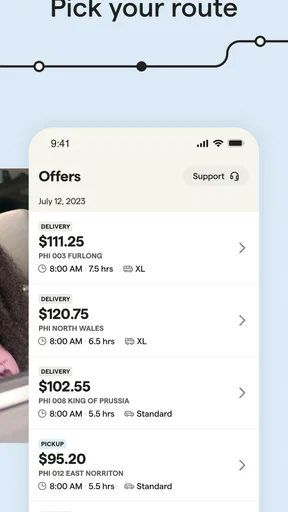
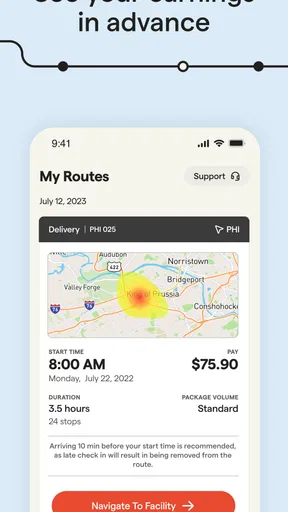
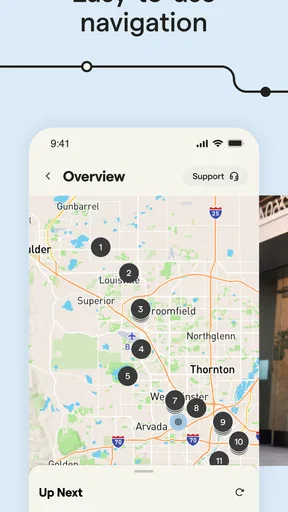

Our Review of Veho Driver
 Analysis by Appyee
I approached Veho Driver as a working tool rather than a casual app: something you open when you are trying to organize delivery work, choose a route, and get moving without turning the planning process into a second job. Developed by Veho, this free business app is aimed at drivers who want more control over the areas they cover and the length of their trips. That focus makes it different from a typical navigation app, because the main decision is not simply how to reach one destination. It is whether a particular delivery opportunity fits your day.
My overall impression is positive, but practical. The app can be useful when flexibility matters more than having a fixed schedule handed to you. It is especially appealing if you already understand the demands of delivery driving and want a mobile way to review available work. At the same time, it is not a magic solution for every part of the job. Your phone, connection, vehicle, timing, and the wider delivery process still matter. The application can help you manage the work, but it cannot remove the real-world friction that comes with driving from stop to stop.
What the app is really useful for
The central appeal is choice. Instead of treating every driver as if they has the same availability, the experience is built around selecting routes, areas, and trip length that make sense for the individual. That can be valuable for someone fitting delivery work around another job, family responsibilities, or a changing weekly routine. I would not describe it as a general business organizer; its purpose is much narrower and more practical: helping Veho drivers decide which work fits their plans.
That distinction is important before installing it. If you are looking for a conventional map, a mileage tracker, an invoicing tool, or a broad courier marketplace, this is not the right category of app. Its usefulness depends on being a Veho driver and on having delivery work that matches your location and availability. For the right person, that focused approach is a strength. For someone who only wants occasional navigation or a way to compare every delivery platform in one place, it will feel limited.
I also like that the app is free to install. There is no purchase decision standing between a driver and the initial test. The age rating is Everyone, which makes the software itself approachable, although the work it supports obviously requires an appropriate driver and vehicle situation. On the store, it has a 4.6 average from around 14 thousand ratings, with roughly 2 thousand written reviews and over 500 thousand installs. Those figures suggest that it has reached a substantial driver audience, while still leaving room for individual experiences to vary depending on region, phone, and workload.
Where people are most likely to get stuck
The first point of friction is usually not the route itself. It is the difference between what a new user expects and what a driver-focused app is designed to do. Someone may install it expecting immediate delivery offers, then wonder why the screen does not behave like a standard shopping or navigation app. Before judging the software, I would make sure I am using the correct driver application, have the account details associated with my work, and understand that available choices can depend on the work environment rather than on the app alone.
Another common stumbling block is treating route selection as a one-time decision. In practice, a route that looks attractive in the morning may be less convenient once traffic, loading time, fuel, parking, or the end location of the trip are considered. The app can present a work choice, but I still need to think beyond the first stop. A short trip may be easier to finish, while a longer one may make more sense if it ends near home or another planned commitment. The best option is not always the one with the fewest miles.
There is also a human-factor issue. Drivers often use their phone while moving between tasks, so a small interruption can feel larger than it would in an office app. If I am checking a route while carrying packages, entering a vehicle, or dealing with a busy pickup area, I am more likely to miss a prompt or make a rushed choice. My practical advice is to review the important details while parked, then use the app with a clear plan rather than trying to solve every decision at the curb.
Setup checks that prevent avoidable problems
Before relying on the application for a working day, I would do a short setup routine. First, I would update to the current version, which is 3.4.4, then close and reopen it after signing in. That simple restart is useful when an installation has just been completed or when an older session is still hanging around. I would also check that the phone has enough battery for the entire shift and that the device can maintain a stable mobile connection in the areas where I expect to drive.
Next, I would confirm the account rather than repeatedly guessing at login details. If access fails, carefully re-entering the credentials is safer than creating a second account or changing information unnecessarily. I would make sure the phone is using the intended account and that the app has been installed from the official app store. These checks sound basic, but they separate an account problem from an application problem and save time when support is needed.
I would then open the relevant route and area screens before leaving. The goal is not to memorize everything, but to learn where the choices appear and what information is shown before accepting or planning work. This is one of the more useful habits with a driver app: explore while stationary, not during the first hectic part of the day. If the interface feels confusing at home, it will feel worse beside a vehicle with a schedule to maintain.
It is also worth preparing a fallback for ordinary phone issues. Keep the device charged, make sure the screen is readable in daylight, and avoid starting a shift with dozens of unrelated apps competing for attention. I would not assume that reinstalling is the first answer. Reinstallation can remove local session information and create another login step. I would reserve it for cases where restarting the app and checking the connection have not helped.
A calmer workflow for choosing and completing work
My preferred workflow begins before the vehicle moves. I would decide how much time I genuinely have, identify the areas that make sense for that day, and then compare the available trip lengths with the rest of my schedule. This prevents a common mistake: choosing work based only on the first appealing option and discovering later that the return journey or final stop makes the day impractical.
For example, imagine I have a free morning but need to be back across town in the afternoon. I would not automatically choose the longest route. I would look for an area that keeps me reasonably aligned with the later commitment, even if another option appears more ambitious. That is where the app's emphasis on route, area, and trip length becomes genuinely useful. It supports a decision based on the shape of my day, not just the amount of driving in isolation.
Once I have chosen work, I would treat the app as one part of the workflow. I would review the route while parked, organize packages in an order that reduces searching, and use navigation separately if that is more comfortable for turn-by-turn driving. A driver app and a navigation app do not necessarily need to replace each other. In my experience, separating the decision about what work to take from the decision about how to reach each stop can make the process easier to manage.
A useful advanced habit is to build a personal record of what makes an area convenient. I would note whether a route tends to fit my preferred working hours, whether the final location leaves me well placed for the next obligation, and whether the trip is tiring even when the distance looks reasonable. The app may help me choose the assignment, but only repeated personal observation tells me which choices work best for my vehicle, driving style, and daily routine.
Recovering when the workflow breaks
If a route or screen does not load, I would first stop and identify the exact failure. Is the whole app unresponsive, or is only one page missing information? Can the phone open another app that uses the internet? Does the problem remain after closing and reopening the application? These questions are more useful than immediately blaming the route or accepting a different assignment without understanding what happened.
For a temporary display problem, I would close the app, wait briefly, and reopen it while parked. If the phone has weak service, I would move to a safer location with a better connection before trying again. I would avoid repeatedly tapping buttons, because that can make it unclear whether an action was accepted once or several times. A slow response should be treated as a reason to pause, not as an invitation to submit the same choice repeatedly.
If signing in is the issue, I would check the account details and the phone's connection before reinstalling. If a route selection appears to have changed unexpectedly, I would reread the current screen and confirm the status rather than relying on memory. Screenshots or notes can help when explaining a problem, provided they do not expose private account information. The useful principle is to preserve a clear record of what happened and when, without inventing a technical explanation.
There are limits to what a driver can repair locally. If the same issue continues after a restart, a connection check, and a current installation, contacting Veho through its established support channel is more sensible than experimenting with unfamiliar settings. I would describe the phone model, the app version, the screen where the issue occurred, and the steps that already worked or failed. That gives support something actionable instead of a vague report that the app is broken.
When the app is not the cause
Delivery work creates problems that no app can fully control. A late arrival may come from traffic, parking restrictions, loading delays, weather, an unavailable recipient, or an address that is difficult to access. If the application is displaying the route correctly but the day is running behind, the solution may be a change in driving or organization rather than another reinstall.
Phone hardware can also be the weak point. An aging battery, overheating device, damaged screen, or unreliable mobile signal can make a good application appear unstable. I would test the phone outside the delivery workflow: open other normal apps, check whether the connection drops, and see whether the device behaves differently when it is cool and fully charged. If several apps fail in the same conditions, replacing or repairing the phone may help more than changing the driver app.
Navigation is another area where expectations need care. A route choice inside a driver platform is not the same thing as a guarantee that every turn, entrance, parking point, or building access will be simple. I would use common sense at each stop and never allow the phone's instructions to override safe driving. If a destination seems wrong or inaccessible, stopping to verify it is better than forcing the vehicle into an unsafe position.
The app may also be the wrong tool for a particular goal. If I want detailed expense accounting, customer relationship management, broad fleet administration, or a complete navigation history, I would choose software built for those jobs. Veho Driver is more suitable as a focused work-selection and driving companion for Veho drivers. Trying to turn it into an all-purpose business suite would create frustration that is really caused by choosing the wrong tool.
Who should use it, and who should skip it
I would recommend trying it if you drive for Veho, value control over the areas you work in, and prefer matching trips to your available time. It is a good fit for someone who likes making practical trade-offs: perhaps taking a shorter route on a busy day, or choosing a different area because the end of the trip works better with personal plans. The free price also makes testing the workflow relatively straightforward.
I would be more cautious if you need guaranteed consistency, dislike making decisions before every shift, or expect the app to provide the same experience regardless of location and phone conditions. Drivers who want a fixed employer-assigned routine may prefer a system with fewer choices. Likewise, someone looking only for a standalone map should install a navigation app instead. The flexibility here is valuable only if flexibility is what you actually want.
Veho Driver was released on September 4, 2019, and the current version shows that it remains an actively maintained part of the driver's experience. I would still judge it by the daily workflow rather than by age or popularity. A mature app can feel dependable in one situation and awkward in another, especially when the work depends on live availability, account access, and conditions outside the phone.
My practical verdict after using it
The strongest reason to use Veho Driver is control over the shape of your working day. It gives Veho drivers a focused place to consider routes, areas, and trip length instead of forcing every decision into a fixed pattern. I found that the app makes the most sense when I plan before driving, keep realistic expectations about delivery work, and treat connection and phone readiness as part of the setup.
Its limitations are equally clear. It cannot solve traffic, parking, poor signal, battery trouble, account confusion, or an unsuitable route choice. It is not a replacement for every other tool a driver may need, and it is not ideal for people who want a completely automatic schedule. The best results come from using it deliberately: check the account, update the installation, review choices while parked, and keep a simple recovery plan for moments when the screen or connection misbehaves.
For a Veho driver who wants a free, focused business app and appreciates choosing work around real-life commitments, I think it is worth installing. I would recommend a short trial during a low-pressure shift rather than making it the foundation of an important day immediately. If the route and area choices fit your routine, the app can become a useful part of your driving toolkit. If your needs are broader than that, a separate navigation or business application will likely be a better companion rather than a replacement.
Privacy and Permissions
See what permissions an app requests and how it handles your data.
- Location
- approximate location (network-based), precise location (GPS and network-based)
- Photos/Media/Files
- read the contents of your USB storage, modify or delete the contents of your USB storage
- Storage
- read the contents of your USB storage, modify or delete the contents of your USB storage
- Camera
- take pictures and videos
- Microphone
- record audio
- Wi-Fi connection information
- view Wi-Fi connections
- Other
- view network connections, full network access, change your audio settings, run at startup, draw over other apps, control vibration, prevent device from sleeping, modify system settings, Google Play license check, read Google service configuration
Verdict
Strengths of Veho Driver
- Clear delivery routes help drivers plan each shift efficiently.
- In-app navigation makes finding customer addresses more convenient.
- Delivery updates can reduce the need for phone calls and paperwork.
- Flexible gig-style work may suit drivers seeking independent schedules.
- Digital proof of delivery helps keep completed orders organized.
Limitations of Veho Driver
- Earnings and available routes may vary significantly by location.
- The app depends heavily on a stable mobile data connection.
- Long shifts can involve substantial driving, parking, and vehicle costs.
- Some users may experience occasional delays in status or route updates.
- Driver support response times may not always meet urgent needs.
Similar Picks in This Category
View All
LinkedIn: Community & Network
LinkedIn3.8

Zoom Workplace
zoom.com4.1

Microsoft Teams
Microsoft Corporation4.6

Meta Business Suite
Meta Platforms, Inc.4.6

Webex Meetings
Cisco Systems, Inc.4.5

TeamViewer Remote Control
TeamViewer4.4
Frequently Asked Questions
What is Veho Driver, and who is it designed for?
Veho Driver is a delivery-driver app designed for independent drivers who complete scheduled routes and deliver packages to customers. It typically provides route details, stop information, navigation support, delivery instructions, and tools for confirming completed deliveries. It is intended for approved Veho drivers rather than customers who are simply tracking an order or booking a delivery.
How do I become a driver and start accepting routes with Veho Driver?
Before using the main delivery features, you generally need to apply through Veho and complete the required approval process. This may include identity verification, driving-record checks, vehicle and insurance requirements, onboarding, and availability confirmation. Once your account is approved, the app can be used to view available work, review route details, and follow Veho’s procedures for accepting and completing deliveries.
What features does Veho Driver provide during a delivery route?
The app is built to support drivers throughout the route, with access to assigned stops, package or order information, delivery notes, navigation assistance, and status updates. Drivers can usually mark deliveries as completed and submit required proof, such as a photo or delivery confirmation. The exact tools available may vary by location, route type, account status, and current Veho policies.
Does Veho Driver require location services, mobile data, or a constant internet connection?
Veho Driver relies on several phone functions to work properly during deliveries. Location services are important for navigation and recording delivery activity, while mobile data may be needed to load route information, synchronize status updates, and upload proof of delivery. Some information may remain visible temporarily if the connection drops, but drivers should not assume that every feature works offline and should reconnect as soon as possible.
What should I do if the app crashes, navigation is inaccurate, or a delivery cannot be completed?
If Veho Driver stops responding, first check your internet connection, location permissions, battery level, and whether the app is updated. Restarting the app or phone may resolve temporary problems. For an incorrect address, missing package, unsafe location, customer issue, or failed delivery, follow the in-app instructions and contact Veho driver support through the approved channel. Keep clear notes and submit any requested evidence before ending the route.
